
 Four Gems
 OLing
OLing
 OLog
OLog
 Onahsa
 OTime
OTime
 OSCA
OSCA
 OSLD
OSLD
 Susquehanna
 Utils
Utils
What just happened‽
07/21/2026
 I believe I have just about every public-facing service up and running, so it's now time to go about documenting what happened.
TL;DR: What just happened‽
I got three brand new hard drives for the server with much more capacity. I was running low on storage space, so I decided that I would split my at-the-time current single drive setup into four. I set up one for /, one for /var, one for /srv, and one for /home. Unfortunately, Ubuntu did not like me doing this for /var in particular, and decided instead to wipe both the drive and the backup. Shenanigans ensued.
A Timeline of Events
July 16th, 2026
On the 16th, my three drives arrived in the mail. I had previously put everything on a 600GB SAS drive, and I was starting to run a bit low on space. These new, 1.2TB drives, would allow me to use the other three slots in my server, while also allowing me to expand space significantly. I decided that the best course of action would be splitting the drive into four, as I still had the 600GB one and thus a RAID would be wasting a large amount of space. After making sure that all three drives worked, I put them in and partitioned them. I wanted to put some sort of label on each, marking which one goes to which drive, so I played around with some of the various indicator lights for a bit. After awhile, I found that I could copy the drives to null using dd to get their activity lights going. This was a bit scary, but worked well. I then copied my /home folder to one drive, my /var to a second, and my /srv to a third. This took awhile, though by the time it was done I was ready to mount them. I decided to first test this out with /var. I wanted to make sure that the files I was mounting over weren't still taking space, so I made links to them in my home directory. After that, I mounted the drive over /var. To make sure it worked, I restarted the server. This is when everything broke, horrendously.
I had forgotten that Ubuntu Server in particular does not like it when /var is played around with, in part due to how Snap handles sandboxing. Each package acts as essentially its own partition on the drive, which does not play well with changing partitions. After seeing everything wiped on the new /var drive, I decided to unmount it and go back to the previous /var directory that I had linked in my home directory, as clearly something had gone wrong and I needed to revert. I assumed I would likely also need to reïnstall, though surely with my data on each drive that wouldn't be too much of a hassle. I restarted... and found everything also wiped in the old /var drive. I cannot fathom why this would be the default behavior from Ubuntu, but between this and this LTS kernel bug that I can't seem to get the maintainers to look at, I decided that was enough of Ubuntu Server. Shutting off all I/O on boot on the most recent LTS kernel was strike 1, wiping my /var drive was strike 2, and wiping it a second time was strike 3.
July 17th, 2026
It was clear to me that I needed to take action to salvage what was left of the /var directory, alongside backing up anything that was stored on the server. I used a very lovely tool (ext4magic) to recover all of the files from the /var drive onto my computer, compressed the rest of the files into a tar.xz, then brought it onto my computer. This process took awhile, and did not recover folder names for a majority of what was on /var. I started the process at around 10AM, and it finished up around 6PM. The way I did this was through my Ubuntu Server installation disc; I started a shell, logged in via SSH, then used SSHFS to get the files onto my computer. This worked decently well, though seeing my RAM usage slowly increase as I installed more packages to get this to work was certainly worrisome!
July 18th, 2026
I had been talking to some people that know a bit more about Linux than I do, and they had suggested Rocky Linux as an alternative. I downloaded it, burned the ISO to a disk, and... Rocky Linux doesn't support my CPU configuration. I have two Xeon CPUs that are almost two decades old now, so this was not particularly surprising. I briefly considered just installing Arch on the server, as that's what's on my computer, before deciding that was a terrible idea for obvious reasons. One distro that I knew supported my CPUs is Debian, as Ubuntu is built on top of Debian, and I had been running Ubuntu Server previously. So, I got a second DVD, burned the Debian ISO onto it, and put it into the server. I installed it, and... it didn't boot. Apparently my GRUB partition previously was somehow messing with it, so I did it a second time, and it worked this time! It did however mean that I had to copy everything back from my backup. This is a process I'm still working on, as I find smaller bits that didn't quite make it.
July 19th, 2026
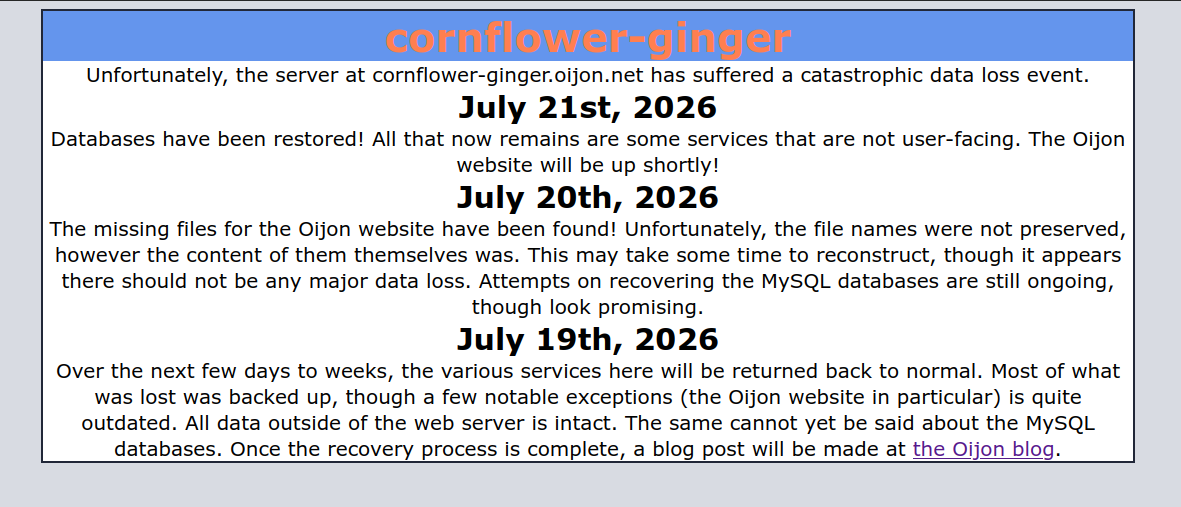
The 19th is when I started copying files back, while also trying to recreate my /var drive. Almost all of the important files were found in either MAGIC-1, MAGIC-2, and MAGIC-3. MAGIC-1 had no folder names, MAGIC-2 had no file names, and I've yet to find a functional file (not counting the plaintext files that don't contain much of use) in MAGIC-3 (though almost all of it seems to be bits that the previous owner of this drive forgot to wipe). Most of the folders in MAGIC-1 were from apt, so those could safely be ignored. I eventually found the Oijon folder, though it was missing all of the most important files, those being the ones for the main page! I had a backup, though that backup was a bit outdated for my liking. The website also relies on a database, I hadn't seen anything resembling a MySQL database yet, and I was not liking the prospects of recreating it by hand. I decided to make a quick little status page that'd explain what was going on. I took most of the CSS from the Debian "It works!" page, and wrote the first entry:
Over the next few days to weeks, the various services here will be returned back to normal. Most of what was lost was backed up, though a few notable exceptions (the Oijon website in particular) is quite outdated. All data outside of the web server is intact. The same cannot yet be said about the MySQL databases. Once the recovery process is complete, a blog post will be made at the Oijon blog.
July 20th, 2026
The missing files for the Oijon website have been found! Unfortunately, the file names were not preserved, however the content of them themselves was. This may take some time to reconstruct, though it appears there should not be any major data loss. Attempts on recovering the MySQL databases are still ongoing, though look promising.
On the 20th, I figured out that the missing files were in MAGIC-2. I suspect this was due to these files being read by apache2 when Ubuntu did its /var wipe, though I can't be certain if this is the case. Either way, I looked at each file, matched it to where I remember its file name going, and got a working-ish PHP website. The main issue was the MySQL database. Most of the content of the website is stored on there, and I really, really did not want to remake it by hand. I decided to do a search via baloo for the file extensions needed, however my backup directory was too large, and after about 12 hours of searching Dolphin crashed due to using too much memory. This was not ideal, and I feared that perhaps parts of the database would end up in MAGIC-2 or MAGIC-3. I looked through them and found no trace of the database. I found it incredibly unlikely that the drive that had just about nothing overwritten would've just had the entire database overwritten and nothing else, so I assumed that must mean that the database was somewhere in MAGIC-1.
July 21st, 2026
Databases have been restored! All that now remains are some services that are not user-facing. The Oijon website will be up shortly!
Eventually, I found the database. Turns out it was in a folder that I had skipped on accident. Finding the database fully intact, I went and put it into the MySQL directory on the server. This was rather scary, as the Ubuntu version of MySQL server is several versions behind the Debian one, and I was not certain they'd be compatible. Thankfully, they were! The database was restored with no data loss. Once I got this up, I got to work getting this website public-facing again. There were a few things that I needed to fix, apparently I had been enabling modules in apache2 incorrectly before, leading to some with null configurations. This was not particularly ideal, but was fixable. I used apt to download apache2 into the cache, brought it to my user directory, extracted it, then got the missing files. I didn't want to reïnstall the entire thing outright, as if I had done that, I would've lost my configs. Granted, I know there's at least 7 backups of those, but I don't remember off-hand where those backups are. Once I had that set up, I moved over the final missing file of the server (downloads), and brought it back up. There's still some things down, but I'm the only one impacted by those services. Soon all will be back to normal.
Some takeaways
Much of what happened here was due to there not being any (recent) off-site backups. Though I had backups, they were on the server itself, which was running low on space. I need to find some sustainable way to make off-site backups. Having them on my computer is not particularly sustainable, as I am also running low on space there. I'm eyeing a few servers on eBay that are very affordable, that if I get some SAS drives in, could work for this.
This was not a particularly fun experience. I hope this never happens again. That said, the drives I have will someday fail. That is something I need to prepare for, with off-site backups.